
In this tutorial, we will focus on how the tables are structured in Oracle Fusion Cloud (FSCM) and how to find and link them for reporting. For the general steps on building a report in BI Publisher, see our companion tutorial, "Creating Custom Reports with BI Publisher".
The data you want has to be pulled into a data model first, then linked to a report template in BI Publisher. Oracle does publish documentation for its tables, but that assumes you already know which table your data lives in.
In practice, you often don't. It is easy to spend more time hunting for the right table than you spend pulling the data once you have found it. This tutorial is here to help you track down table names faster.
EXTRACTING TABLE AND COLUMN NAMES FROM FSCM
If you are new to FSCM and don't yet know what tables exist, start with the query below to pull every table and column name from the schema.
SELECT TABLE_NAME, COLUMN_NAME FROM ALL_TAB_COLUMNS
ALL_TAB_COLUMNS is an Oracle data dictionary view that lists the columns, along with their table names, for everything your account can access. Once you have the results, export them to an Excel spreadsheet so you have them on hand for later. The tables follow a naming convention you can search on, as long as you have a rough idea of which module the data sits in.
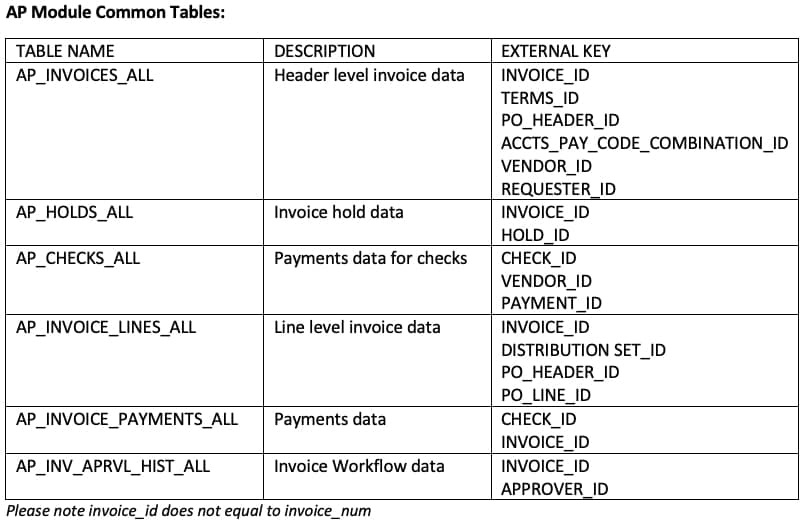
For example, all the data from the AP (Accounts Payable) module lives in tables that start with "AP_", as shown in the image.
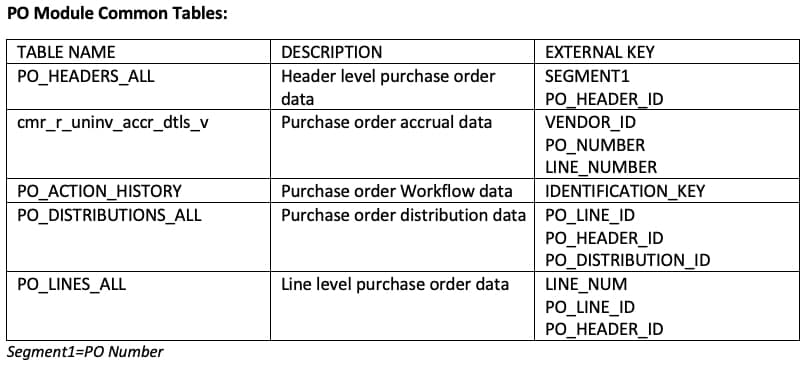
Common PO (Purchasing) module table names are shown below:
Some other common table names are shown below:
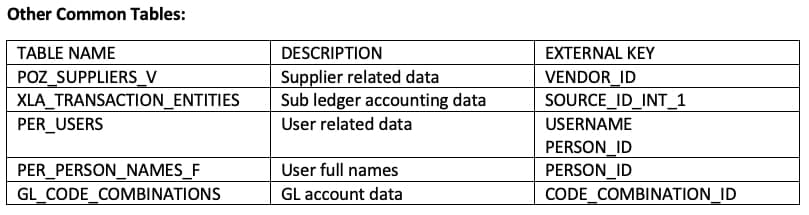
These are the table names we reach for most often when building reports. For anything beyond them, send us a message using the form below and one of our consultants will get back to you shortly.