

OUR CLIENT
Our client is a Fortune 500 leader in the entertainment industry, with global market share and billions of dollars in annual revenue.
| Industry | Market | Revenue |
|---|---|---|
| Entertainment | Global | $12 Billion |
Our client hired CloudADDIE to help modernize their finance operations on a global scale. Part of that initiative set out to manage and improve global account reconciliation by automating the work and reducing the security and risk concerns that usually come with the reconciliation process.
They chose CloudADDIE for our track record of delivering custom enterprise solutions that the Big 4 consulting firms cannot.
CHALLENGE
Our client wanted to streamline how reconciliations get created by importing profiles as soon as new accounts appear in the ERP system. When balances are loaded for profiles that do not yet exist in ARCS, the load produces errors that the ARCS administrator has to track down and clear by hand.
ARCS PROFILES
Profiles are among the most important objects in Account Reconciliation because they are the precursors to reconciliations. A profile holds everything a reconciliation needs before it exists: the account or accounts being reconciled, the format and method, the current preparer and reviewer, instructions, and a risk rating. One profile exists for each reconciliation, and a single profile can cover one account or roll several lower level accounts into one reconciliation.
Profiles can be created by hand or imported from a spreadsheet.
| Scope | Maintenance | Formats |
|---|---|---|
| 100,000 Profiles | Weekly | 7 (VA,AA,BC) |
Our client built profiles by hand across seven formats, each based on one of three methods: Variance Analysis, Account Analysis, and Balance Comparison.
IMPORTING BALANCES
The client's reconciliations pulled balances from a cloud General Ledger ERP system. Source systems and subsystems were set up to match the reconciliation methods.
| Data Loads | Integrated Systems |
|---|---|
| 14 Locations | Oracle Fusion Cloud Financials & ARCS |
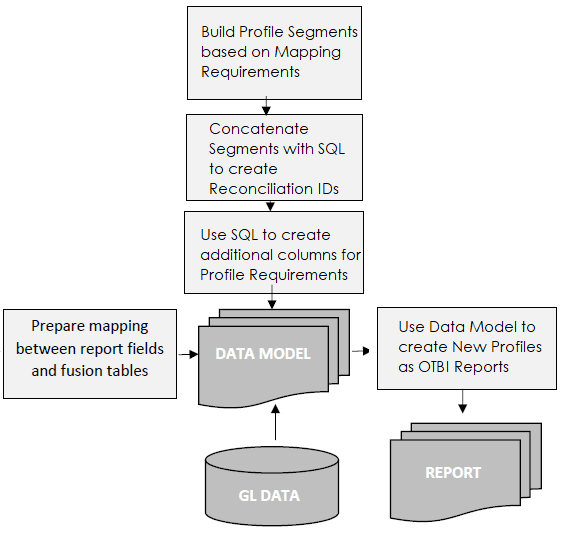
Balances had to reach 14 locations with as little mapping work as possible.
The job was to create new reconciliation account IDs in Oracle Fusion Cloud Financials, export the new profiles from the ERP, export balances for the seven formats, import the new profiles into ARCS, and load the balances into ARCS across all 14 locations.
SOLUTION
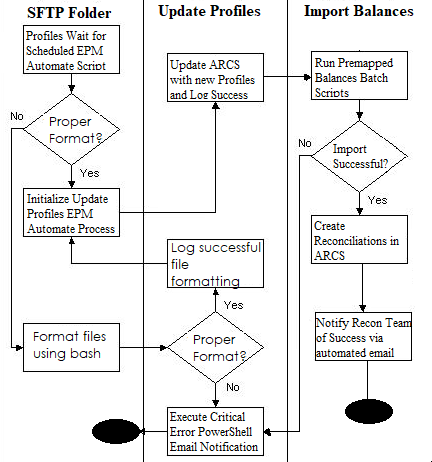
To keep the mapping work to a minimum across 14 locations, CloudADDIE built premapped balances. By pulling reports out of the ERP with SQL queries, we simplified the mapping design. New profiles were found by comparing the latest profile extract against the profiles already in ARCS, and PowerShell kept only the unique rows, inserted headers, and renamed and prepared the profiles on its own so EPM Automate could carry the rest of the process forward.
EPM Automate
EPM Automate is a utility that lets administrators run and schedule repeatable tasks in Oracle EPM Cloud without manual steps. We paired its commands with shell scripting and a robust error handling design to run ARCS processes from start to finish, including importing profiles, importing balances, creating reconciliations, and sharing reports.
OTBI
We built data models in Oracle Transactional Business Intelligence (OTBI) to produce reports for both premapped balances and profiles using SQL. Premapped balances let us skip Data Management altogether and avoid the mapping errors that import formats can introduce. For profiles, we compared each new OTBI report against the prior one and kept only the difference, so we imported just the new profiles rather than reloading all 100,000 every time.
PowerShell
PowerShell handled two jobs on this project. The first sent custom email alerts to the ARCS administrator whenever any system hit an error. The second ran the ETL, converting OTBI report exports from Excel to CSV, removing duplicate profiles, inserting headers, and formatting files so they were ready to import into ARCS.
RESULTS
New profiles were created and imported, period balances were loaded for 14 locations and 100,000 profiles, reconciliations were created, and reports went out to the right people. All of it now runs on its own. The only time anyone steps in is when the system catches a critical error, at which point a custom alert goes to the ARCS administrator with a clear description of what went wrong. Admins can troubleshoot from those plain language details rather than digging through the default Data Management (FDMEE) error logs.