
Most variance reviews follow the same script. Someone pulls the report, someone else spots the number that moved, and the next twenty minutes go to figuring out whether it matters. By the time the room agrees on an answer, the decision window has usually narrowed.

Oracle's Intelligent Performance Management (IPM) capabilities inside Cloud EPM are built to shorten that loop. IPM Insights, the piece most finance teams end up caring about, watches your planning data and raises a flag when something crosses a line you defined. You still make the call. You just stop hunting for the thing that needs a call.
I want to walk through how it actually works, and then spend real time on the prerequisites, because that is where most implementations get surprised.
IPM Is a Family, Not a Single Feature
- IPM Insights finds patterns and exceptions in your data and surfaces them to planners.
- Auto Predict generates predictions from historical data using time series forecasting and can run on a schedule.
- Advanced Predictions uses machine learning algorithms for multivariate predictions.
- Machine Learning Model Import, sometimes called Bring Your Own ML, lets you import a trained PMML model built by your data science team and put it to work inside Planning.
How IPM Insights Works, Start to Finish
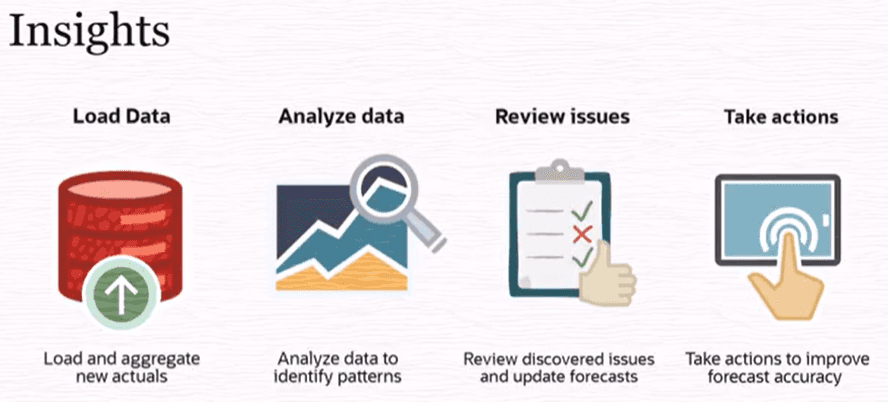
An administrator builds an insight definition in the IPM Configurator. That means picking the analysis type, defining the historical and future data slices, setting metrics and thresholds, and choosing which dimensions planners will see on the Insights dashboard. Definitions are saved as global artifacts and travel with your maintenance snapshot.
From there the job runs on demand or on a schedule, typically after an actuals load. IPM evaluates the data against your thresholds. Anything that breaches becomes an insight, sorted by impact so planners work the biggest deviations first. Administrators also set impact magnitude thresholds that bucket insights into High, Medium, and Low priority.
Planners then review, comment, tag colleagues, and act. For prediction insights they can update the forecast directly from the analyzer view, or override the predicted values first and then apply them.
That last part is the bit worth underlining. The value is not the alert. It is that the action lives in the same place as the finding.
The Four Insight Types
- Forecast Variance and Bias. Compares two historical scenarios, usually Forecast against Actual. Variance tells you how accurate planners were. Bias tells you which direction they lean. Consistently forecasting above actuals is over-forecasting bias; consistently below is under-forecasting bias. You set an error tolerance percentage, plus separate variance and bias metrics and thresholds, and an insight fires when either one is crossed.
- Prediction. Compares a planner's forward-looking forecast against a machine-generated prediction. If you do not have prediction data, Auto Predict generates it for the slice you defined. You can also feed in a machine learning prediction instead. Beyond variance, this type can calculate risk, for example the probability of hitting a target forecast. An insight fires when deviation or risk crosses your threshold.
- Anomaly. Detects outliers in historical data: spikes, sudden declines, missing actuals, unusual volatility. The threshold here is a Z-score, and Oracle's guidance is that a value around 3 or negative 3 is a reasonable starting point for what counts as an outlier. You can also tell IPM to treat known events, like a promotion-driven sales spike, as expected rather than anomalous, which cuts a lot of noise.
- Period Movement Variance. The newest addition, introduced in the July 2026 (26.07) update. It detects significant movement between the current period and a benchmark period, which makes it the right tool for monitoring an account, KPI, or metric you care about. Benchmarks include previous period (the default), year over year, a custom period, and historical average. You choose whether the variance metric is by percentage or by absolute value, then set the threshold. A common setup: raise an insight when Sales moves more than 10 percent against the prior month.
The Prerequisites People Find Out About Too Late
This is the section I would read twice.
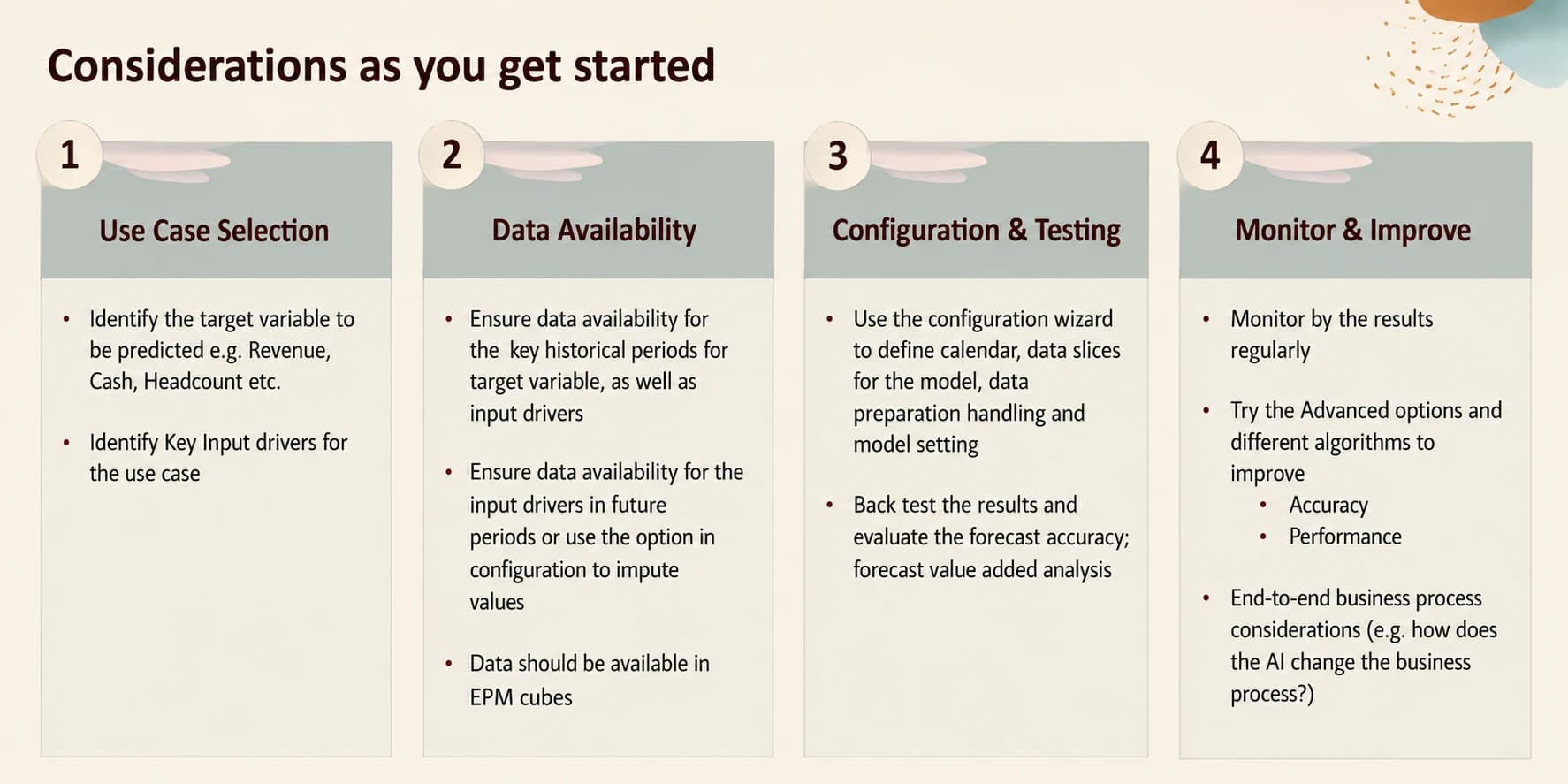
- You need an EPM Enterprise subscription. IPM Insights is not available on EPM Standard, and it is not supported on legacy PBCS or EPBCS. If your licensing conversation has not happened yet, have it before you scope the work.
- Hybrid mode has to be enabled. Across Planning, Freeform, FCCS, and Tax Reporting, Hybrid Essbase is a hard requirement.
- Security is honored, with one exception worth knowing. IPM Insights respects member-level and cell-level security, so planners only see insights for data they can access. But Oracle is explicit that insights are not generated at all for a user when cell-level security is defined on the Year or Period dimensions. If your security model does that, test it early.
- Historical data has a rule of thumb, not a vibe. Oracle's guidance is at least twice as much history as the number of periods you are predicting. Predicting twelve months means you want twenty-four months of history minimum.
- Role assignment has an option now. The IPM - Manage application role, added in the October 2025 (25.10) update, lets a Power User, User, or Viewer configure and manage IPM jobs without handing out Service Administrator. It applies to Planning, Freeform, and Enterprise Profitability and Cost Management. Good separation of duties, and worth using.
- Adding dimensions later breaks things quietly. If you add a dimension to the application after an IPM job is created, you have to reconfigure the job to include it. Nothing tells you loudly. Put it on your change checklist.
Related tip: build the insight job at the lowest Period level available, because that level determines the granularity of the prediction and how much history gets used.
Threshold Design Is the Whole Game
Configuration quality decides whether this becomes useful or ignored.
Set thresholds too tight and planners get a dashboard full of noise, then stop opening it.
Set them too loose and you miss the movement that mattered.
The practical approach is to start conservative, run the job against a period you already understand, and check whether the insights it produced match what your team flagged manually. Tune from there. Also note that if you change the variance metric on a Period Movement Variance insight and rerun the job, previously generated insights get dismissed and regenerated, since the POV is unchanged.
Recent Additions Worth Putting on Your Roadmap
A few things have landed that make IPM Insights easier to sell internally:
- Explainability. An Explainability tab shows the metrics and methods behind an insight, which helps when a planner asks why the system flagged something.
- Generative AI summaries. Plain-language narratives for insights. These require an EPM Enterprise Cloud subscription, are English only, are limited to certain OCI regions, and administrators need to rerun existing insights before users see them. Oracle also notes, correctly, that GenAI output should be reviewed rather than trusted blindly.
- Smart View support. Insights can be inserted into Excel, Word, and PowerPoint, with filtering by type, POV, priority, and status, plus comments and explainability tables in Excel.
- Insights from forms and dashboards. As of the July 2026 update, planners can view insights based on the POV of the data they are already looking at, instead of navigating to the Insights list.
Where This Leaves You
IPM Insights is not magic, and it is not a substitute for judgment. What it does well is take the search step out of the process. Instead of reviewing everything to find the few things that moved, your planners open a list of things that already moved and start asking why.
Getting there needs three things: the right subscription and Hybrid setup, enough clean history for the statistics to mean something, and thresholds tuned by people who know what a meaningful change looks like in your business. Get those right and it stops being a feature you demo and becomes part of how the close and the forecast cycle actually run.
If you are evaluating IPM for your EPM environment, the prerequisites list above is the fastest way to find out whether you are ready or whether you have groundwork to do first.