
Why Report Packages Matter
A Report Package gives everyone working on a report a single place to bring together content and data from across the business. Because each contributor works inside the same package, people can check the material for accuracy and clarity before any of it goes out. A package can also be shaped around the people who will read it, whether that is a board of directors reviewing quarterly results, a regulator expecting a filing in a set format, or investors reading the annual report.
What a Report Package Is and What Goes Into It
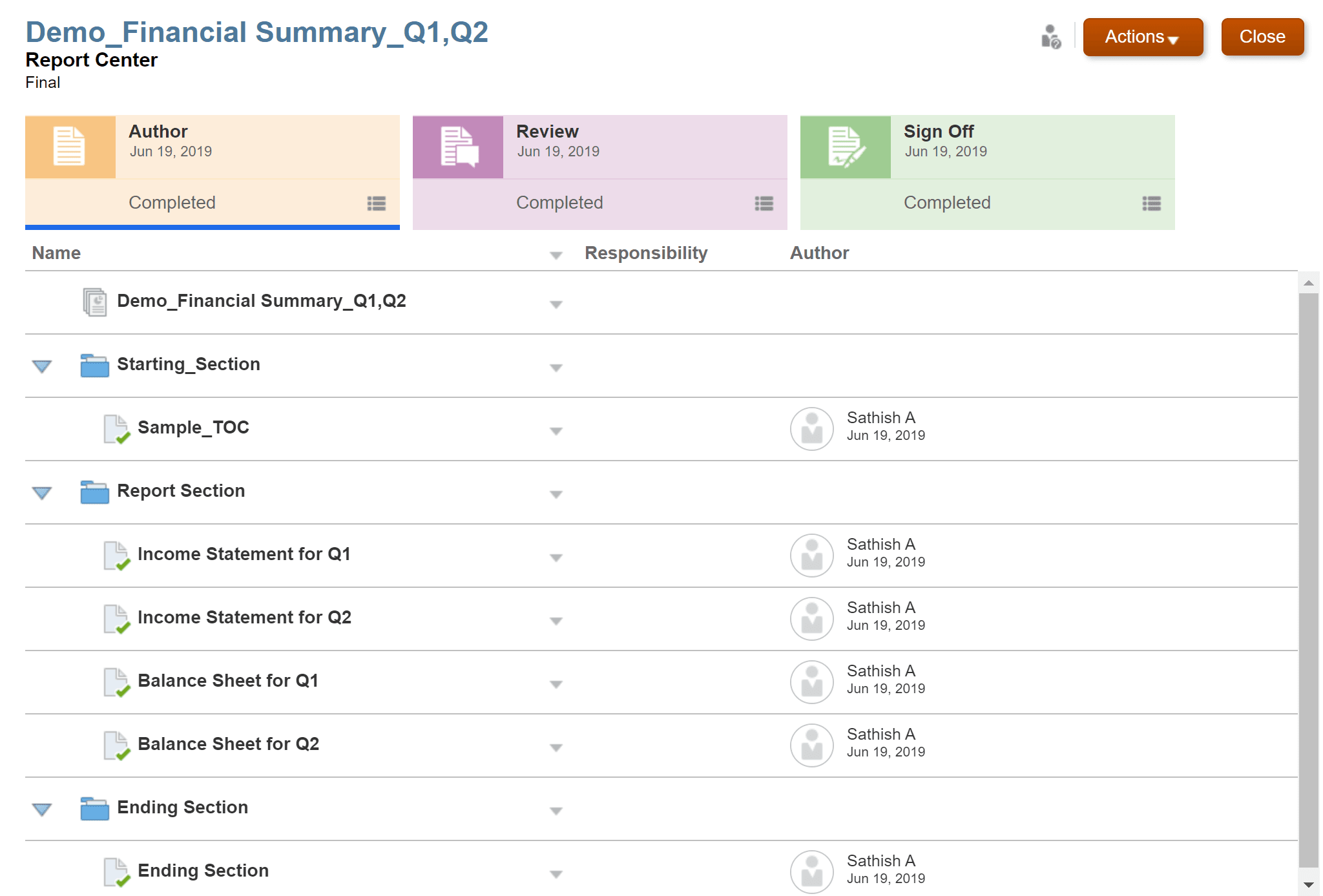
A Report Package is the structure Narrative Reporting uses to turn a report written by many hands into one managed document. Instead of emailing drafts back and forth, contributors author, review, and sign off in the same place, guided by clear assignments, due dates, and a set workflow. That structure is what keeps an annual report, a board book, or a regulatory filing from scattering into dozens of disconnected files. Every package is built on a document type, so you start a Word based, PowerPoint based, or PDF based package depending on the format your final report needs.
The individual pieces of a report are called doclets, and a few kinds are worth knowing. Regular doclets hold the content that lands in the finished report; in a Word based package they are Word files, in a PowerPoint based package they are slides, and in a PDF based package they can be Word or Excel files. A sales report might use a separate doclet for each region, while a financial disclosure might have one for each statement, schedule, and note. Reference doclets act as containers for content that gets embedded elsewhere, such as named ranges from an Excel workbook or charts built from Reports; the reference doclet itself stays out of the final output, but the content it feeds into a regular doclet still appears. Supplemental doclets carry supporting material like instructions or background files and can be almost any file type, including PDF and Excel, though they are not merged into the report and sit outside the review and sign off steps.
Once doclets exist, you can group them into sections. A section keeps together doclets that share a format or an audience, such as gathering every financial statement in a disclosure report into one place, which also gives reviewers a filtered view of just the doclets that concern them.
How a Report Package Moves Forward
A Report Package advances through as many as three phases, and you choose which ones your report actually needs. In the author phase, assigned authors add content to their doclets and approvers check and approve it, building the report piece by piece. In the review phase, reviewers read the draft and leave comments, often across more than one round, so the content can be sharpened before it is final. In the sign off phase, the package is locked so nothing more can change, and the people responsible for signing give their final approval.
Once the sign off phase begins, the content stays fixed while signers review it and either approve or reject the report as a whole. If a signer rejects it, the owner can unlock the package, make the corrections, and send it back for another pass. Throughout every phase, the owner controls who can reach which parts of the content, which keeps contributors focused on their own work and cuts down on accidental edits.
For a deeper look at how report packages fit into the full Narrative Reporting process, from doclet authoring through review and sign off, see our overview of Narrative Reporting in Oracle Cloud EPM. And for why report packages, not the standalone Reports module, are still the right tool for this kind of work, see our post on the EPRCS rename and the retirement of classic Financial Reporting.