

Note: This article was first published in 2020 and updated in October 2025 to reflect current Oracle product naming and the current state of hierarchy integration. The core design trade-off it describes still applies.
Oracle Fusion Cloud General Ledger lets you build account hierarchies in which a parent node picks up its children by value range rather than by listing each child individually. When a segment value falls between the lower and upper bounds you define, the range node claims it automatically. This is a genuinely useful maintenance shortcut, and it is also the source of a well-known integration wrinkle when you introduce a master-data management tool such as Oracle Enterprise Data Management. This article explains how ranged parent nodes behave, why they complicate hierarchy integration, and the two practical options for reconciling the two.
How Ranged Parent Nodes Work
In Oracle Fusion Cloud General Ledger, an account hierarchy is a tree with one or more tree versions, built over the segment values held in a chart of accounts value set. Nodes in a tree version are normally arranged in explicit parent-child relationships, but a parent can instead be defined to cover a range of values. Any value that falls inside that range is automatically included under the parent.
The payoff is maintenance effort. With a range node, you do not have to add each new value in two places, once to the value set and again to the hierarchy. You add the value to the value set, and the range detects which parent it belongs under. The one thing to watch is exceptions: a value that falls outside every defined range has to be placed under its parent manually, because no range will claim it.
Why This Matters for Master-Data Management
The wrinkle appears when you decide to govern your chart of accounts from a dedicated master-data tool rather than inside Fusion GL. Today that tool is Oracle Enterprise Data Management (EDM), the cloud successor to the on-premises Data Relationship Management (DRM) product; both are still referenced in the field, and the category is often abbreviated EDMCS.
EDM models master data as explicit parent-child relationships. It maintains segment values, value sets, and trees, and it exports them to Financials Cloud General Ledger, where a scheduled process imports the changes. What EDM does not have is a concept of a range node. It expresses a hierarchy by naming each child under each parent, so it cannot generate, export, or round-trip the range-based auto-inclusion behavior that Fusion GL provides.
It is worth being precise about what has and has not changed since this was first written. Oracle has broadened how account hierarchies can be loaded into Fusion GL, through file-based data import (FBDI) templates, rapid implementation spreadsheets, and REST APIs, so hierarchies are no longer strictly a manual, UI-only exercise. But those mechanisms load explicit node relationships; the range-node behavior itself remains a Fusion-side construct, and EDM's parent-child export model still does not represent it. So if your Fusion ERP chart of accounts relies on ranged configuration, you have two options for bringing EDM into the picture.
Option 1: Move hierarchy maintenance into EDM and model the structure as explicit parent-child nodes, giving up the range.
Option 2: Keep the hierarchy, including its ranges, in Fusion GL, and use EDM to maintain only the value sets.
Example Implementation
Consider a business, "Business A," maintaining an Account segment.
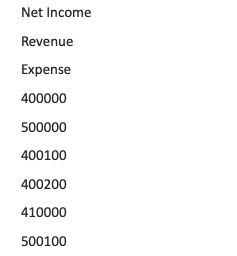
Business A currently maintains an Account value set with the following values.
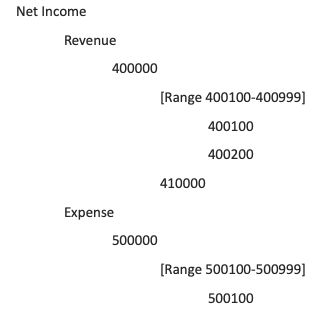
Business A currently uses this ranged hierarchy: parent node 400000 covers the 400100 to 400999 range, while node 410000 sits outside that range. The Expense side of the same value set (parent node 500000) follows the identical pattern, with its own 500100 to 500999 range, so everything below applies equally there.
In this setup, if Business A adds a new value of 400300 to the value set, it is automatically picked up by the 400100 to 400999 range and rolls up under parent node 400000. No hierarchy change is needed. If instead Business A adds a new value of 420000, which, like the existing 410000, sits outside the range, that value has to be added under the 400000 parent manually.
Option 1: Maintain the Hierarchy in EDM
If you take Option 1 and move hierarchy maintenance into EDM, you eliminate the 400100 to 400999 range and place the individual accounts, 400100, 400200, and 410000, directly under the parent as explicit child nodes.
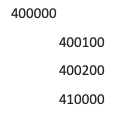
With the range removed, each account is modeled as an explicit child of parent node 400000.
This makes the structure fully compatible with EDM, but it has two consequences. First, you lose auto-inclusion: every new value now has to be added to the hierarchy as a node in EDM, not just to the value set. Second, and easier to overlook, is downstream impact. If the range node itself is referenced elsewhere, for example as a parent in a report or another module, removing it will break those references, because the range no longer exists as a hierarchy member. Anything that pointed at the 400100 to 400999 range would need to be repointed.
Option 2: Maintain Only Value Sets in EDM
If the business has multiple dependencies built on the range, the safer path is to keep hierarchy maintenance, ranges and all, inside Fusion GL, and use EDM to govern only the value sets. New values are created and validated in EDM and exported to Fusion GL, where the existing range function picks them up on import. The hierarchy stays intact, and so does anything that depends on the range node.
The trade-off here is the mirror image of Option 1. Values that fall outside every range, such as 410000, are not claimed by any range and so must still be maintained in the hierarchy manually within Fusion GL. You have kept the convenience of range auto-inclusion for the common case, at the cost of handling the exceptions by hand.
Considerations and Recommendation
Neither option is universally correct. The decision comes down to how many dependencies you have built on the ranges themselves. If ranges are lightly used and mostly a maintenance convenience, Option 1, modeling explicit parent-child relationships in EDM, gives you a single, fully-governed source of truth for both values and hierarchy, at the cost of a bit more node maintenance. If ranges are woven through your reporting and other modules, Option 2 protects those dependencies and confines the manual effort to out-of-range exceptions.
Before committing, inventory every place the range nodes are referenced, in reports, allocations, cross-module integrations, and downstream EPM applications, and weigh that against the maintenance you are trying to eliminate. As of this update, Oracle has made hierarchies easier to load into Fusion GL, but there is still no native way for EDM to produce or round-trip range nodes, so this trade-off remains a real design decision rather than a configuration afterthought. It is worth watching Oracle's roadmap, but plan for the current behavior.
If you would like help evaluating the dependencies in your own environment or designing an EDM-to-Fusion GL integration around them, the CloudADDIE team works with these tools every day and is glad to help.