
Every readiness review counts reconciliations. Very few check whether the right person can open one.
Those are two different tests, and only the first one is easy.
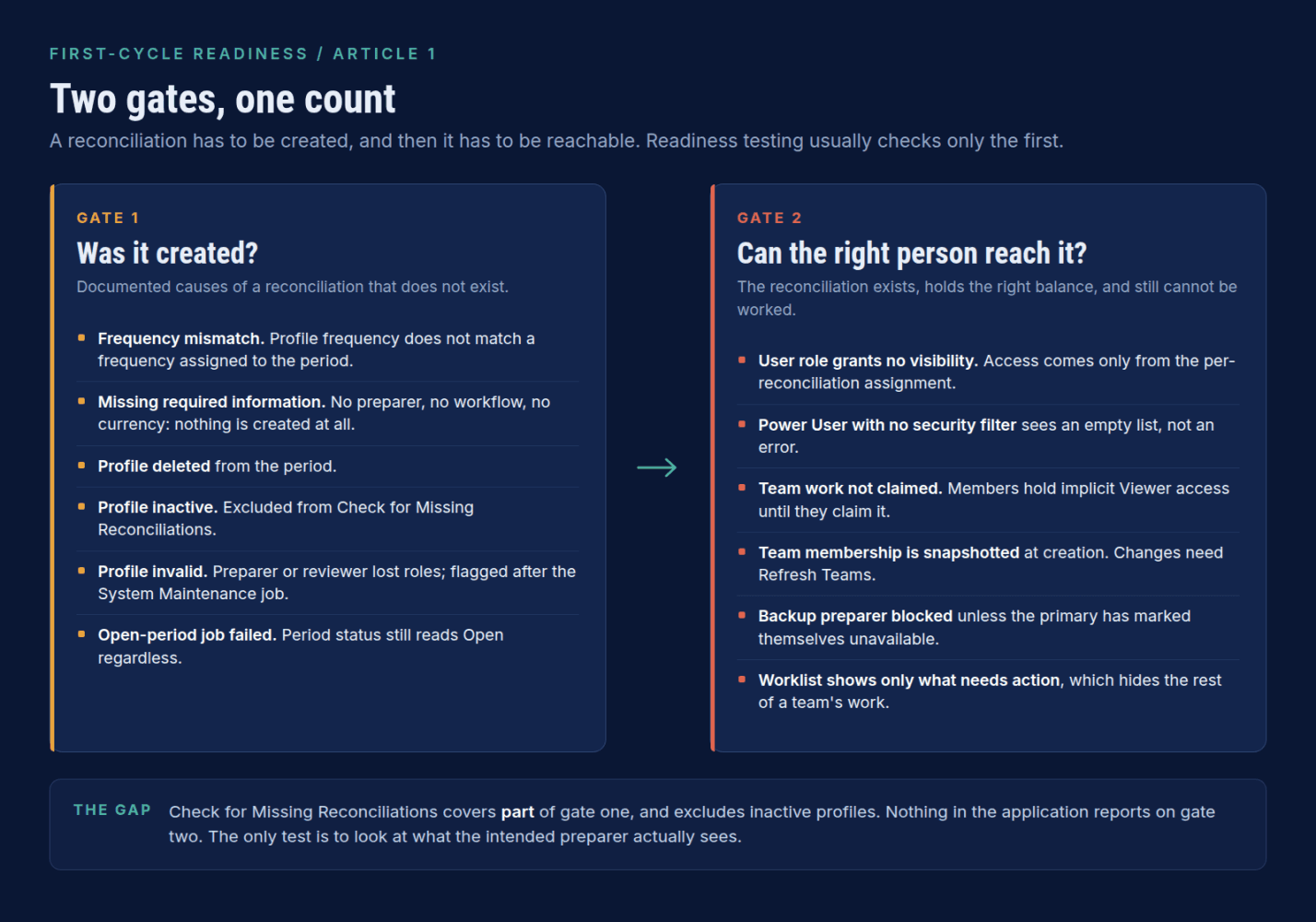
A reconciliation can fail to exist.
It can also exist, carry the correct balance, sit at the correct status, and still be invisible to the preparer who is supposed to work it.
The second failure produces no exception, no error, and no entry in any report.
It produces a support ticket on day two of the close, usually phrased as "I cannot see my accounts."
This article covers both gates.
It is the first of three on first-cycle readiness in Oracle Account Reconciliation. The other two cover profile design and balance loads.
Gate One: Was It Created
The first signal is a count mismatch. You expect a number, the creation summary shows fewer.
Read that summary rather than counting rows afterwards.
It reports how many reconciliations were created, how many profiles failed, and the reason for each failure. It is the only place the system explains itself, and teams routinely close it without looking.
Frequency is the usual cause.
Account Reconciliation creates a reconciliation only when the frequency assigned to the profile matches a frequency assigned to the period.
Defining Monthly as a valid frequency in system configuration does nothing if Monthly was never assigned to the period.
A monthly profile will not produce a reconciliation in a period configured for quarterly frequency only.
"Missing information" means not created at all.
Four reasons a reconciliation can be missing:
- The profile is new, created after reconciliations were created for that period.
- The profile is missing required information.
- The profile was deleted from the period.
- The profile is inactive.
The second is understated by its own name.
If information is missing from a profile, for example a preparer is not specified, a reconciliation is not created. Not created incomplete. Not created and flagged. Not created at all. Workflow and currency information sit in the same category.
So a profile that looks finished in a list view, with an account ID, a format and a risk rating, produces nothing if nobody was assigned to prepare it.
The Exception List Has Its Own Exception
Check for Missing Reconciliations is a period action:
Home -> Application -> Periods -> select the period -> Actions -> Check for Missing Reconciliations
There is also a predefined Missing Reconciliations report.
Both are useful and teams conflate them. The period action is the one that gives you a working exception list during setup, and it exports to Excel, which makes it natural evidence for a go-live decision.
But inactive profiles are not considered when the action runs.
That is worth sitting with.
One of the four documented causes of a missing reconciliation is that the profile is inactive, and the tool most teams use to find missing reconciliations excludes exactly that case.
If a profile was deactivated during build and never reactivated, the action will not tell you. Check the active profile population separately, before you run anything.
The Cause That Is Not on the List
After a profile is created, if the users assigned as preparers or reviewers are removed from the service, or have the required roles removed, the profile is marked as invalid after the System Maintenance job runs. The same applies to commentator and viewer access.
A leaver, a role change, or a provisioning tidy-up between UAT and go-live can invalidate a set of profiles overnight, through a scheduled job nobody was watching. There is a predefined Invalid Profiles report for exactly this. Run it as a standing check in the weeks before go-live, not once during build.
A Period Can Say Open When Reconciliations Did Not Open
This one is documented in the REST API reference rather than the administration guide, which is probably why it is not widely known.
When a period's status is changed to Open, the returned job corresponds to the opening of reconciliations. That job's success or failure does not affect the period's status.
Even if there are failures while reopening reconciliations, the period status still remains Open.
A green period status is not evidence that every reconciliation opened. Check the job result.
The Window Where Corrections Are Still Free
If the period already contains reconciliations, re-running creation overwrites reconciliations at Pending status with current profile information. Reconciliations at Open or Closed status are not updated.
Before the period opens, a profile correction propagates on re-creation. After it opens, the same correction reaches nothing and you are into delete-and-recreate.
Gate Two: Can the Right Person Reach It
Now the half that produces the tickets.
Roles Set Capability, Not Visibility
Service Administrator has unrestricted access. Power User maintains profiles and creates reconciliations, but only for profiles within their security filter. User prepares and reviews reconciliations, and access is controlled by the assignment of the user to the reconciliation. Viewer views.
That User definition is the whole point. Granting somebody the User role grants them nothing to look at. Visibility comes entirely from the per-reconciliation assignment.
For Power Users it is starker. Someone granted the Profiles and Reconciliations Manage role appears in the Power User Security list but must be given a security filter in order to access the Profiles List or Reconciliations List. The related documented behavior is on the Worklist, where an empty list is displayed for Power Users with no security scope defined and no reconciliations assigned.
No error. No permissions message. An empty screen, which reads to the user as a broken environment.
Teams: Three Behaviors That Generate Tickets
First, teams do not grant roles.
Member IDs must already be provisioned with the necessary roles. Adding somebody to a team who was never provisioned achieves nothing.
Second, work must be claimed.
When a team is assigned preparer or reviewer roles, any member can perform the role functions, but only after claiming the reconciliation. Before claiming, the user has implicit Viewer access.
So the reconciliation is visible and read-only, which is the most confusing state in the application for a new user: they can see their work and cannot do it.
Third, team membership is snapshotted.
When a reconciliation is created, the team membership is saved with the reconciliation. Change the membership afterwards and you have to use Refresh Teams from the Actions menu on the reconciliation.
That third one is behind every "I added her to the team last week and she still cannot see it" conversation, and it will happen in your first cycle, because membership always churns in a first cycle.
Backup Preparers Are Not Co-Preparers
In Reconciliation Compliance, a backup preparer can prepare the reconciliation only when the primary preparer's status is unavailable. Availability is a user preference, so somebody has to actively set that status.
A backup who tries to work because the primary is on leave gets nowhere. If continuity during the first close depends on backups, test that somebody knows how to set that status, and who.
A Sequence That Tests Both Gates
- Confirm the expected active profile population, independently of any tool.
- Run the Invalid Profiles report and clear it.
- Create reconciliations and read the creation summary in full.
- Compare expected and actual counts.
- Run Check for Missing Reconciliations and export the results.
- Check inactive profiles separately, since the action excludes them.
- For a sample across organizational units and security filters, toggle the Worklist to the intended preparer and confirm they can see and claim the work.
Steps 1 to 6 test whether the work exists. Step 7 is the one that gets skipped, and it is the only step that tests whether anyone can do it.
A reconciliation that exists but cannot be reached is not a smaller problem than one that was never created. It is a larger one, because nothing in the system is going to tell you about it.
Next in this series: the reconciliation exists and is visible but carries a profile design you corrected weeks ago.