
A successful test in Data Exchange tells you the integration can import and validate the source data.
It tells you nothing about whether Account Reconciliation received the balances.
Separate systems, separate jobs, and the gap between them is where first cycles go wrong.
Third of three articles on first-cycle readiness in Oracle Account Reconciliation. The first covered reconciliations that were never created, or that nobody can reach. The second covered reconciliations carrying a design you already corrected. This one covers loads that report success while the numbers are still wrong.
Balances reach Account Reconciliation only when the load is executed through the period process. Everything below sits between that execution and the balance a preparer actually sees.
One Action, Four Names
Oracle has announced that Data Loads will be renamed Balance Loads, and Invalid Mappings will become Missing Profiles.
Under System Settings, the Data Load tab becomes Balance Load Templates.
The timing moved. The June 2026 readiness notice put these in the August (26.08) update. The September 2026 notice states the same two changes for October (26.10).
The readiness notices call the Periods Actions item Data Loads. The administration procedure calls it Import Data. The same page also describes it as Import Balances from the Periods card.
Home -> Application -> Periods -> Actions -> Import Data
Three names now, a fourth coming. Confirm the label in your target environment before that navigation goes into a cutover plan or a support runbook.
Two Exceptions, Two Different Places
This is the one that costs people a cycle.
The Results column stays blank unless a system error or a completeness error exists, so a blank result means the check ran and found nothing.
Three results matter: Unmapped Accounts, Invalid Mappings, and Missing Currency Rates.
The first two sound identical. They are not, and you will not find them in the same place.
Unmapped Accounts means no mapping rule exists for balances that do exist in the source system. These records appear in the Data Load Workbench under the Invalid filter, which is exactly where an experienced administrator goes.
Invalid Mappings means a mapping rule exists, but it points at a profile that does not exist in Account Reconciliation, and the reconciliation for the current period is missing.
From a Data Integration perspective, that row is correctly mapped. There is a rule, the rule fired, the row has a target. So it never appears under the Workbench's Invalid filter at all.
You find these in Account Reconciliation, through the result link, and you fix them by correcting the mapping rule in Data Management.
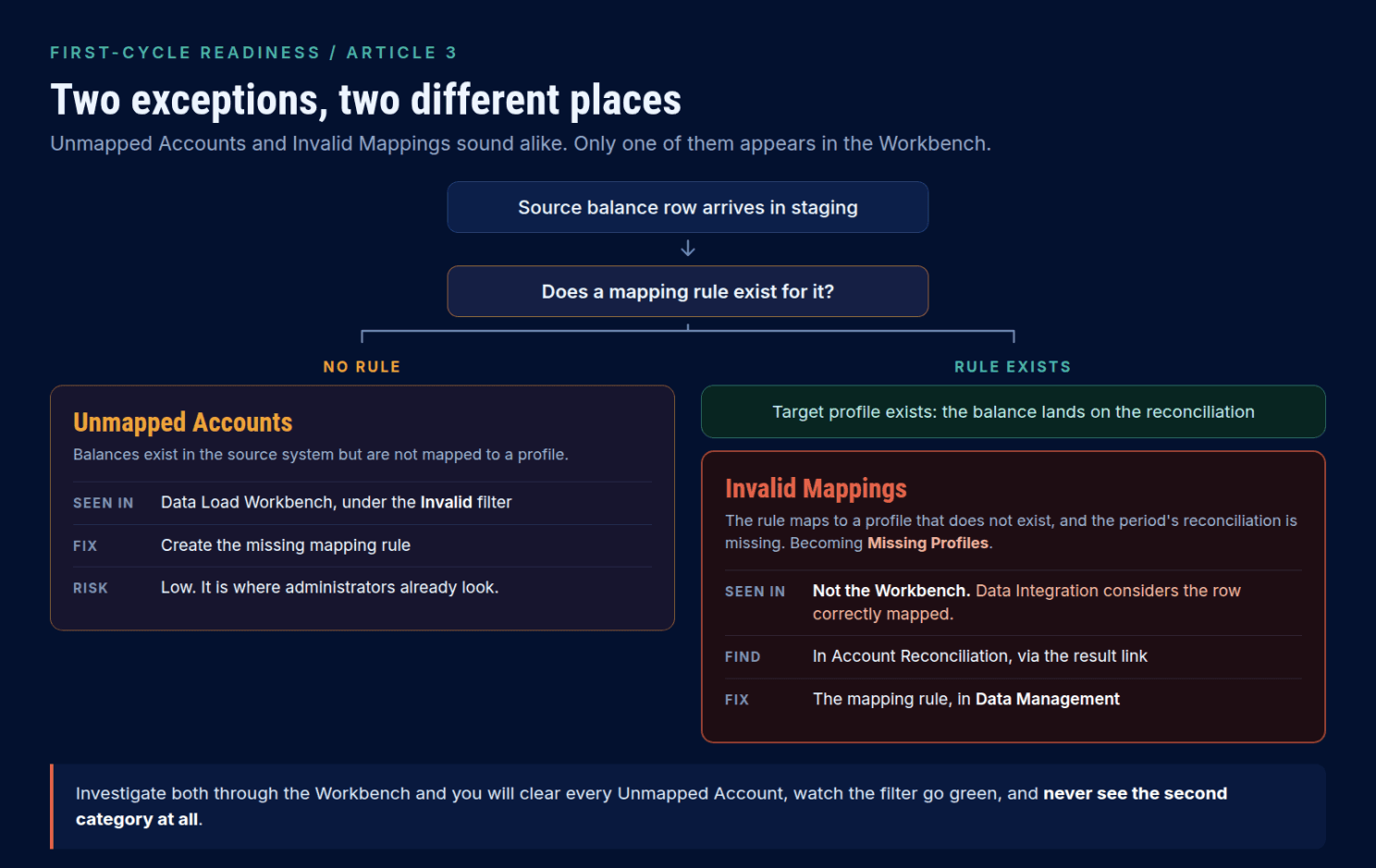
The failure mode is a team investigating both through the Workbench, because that is where mapping problems live. They clear every Unmapped Account, the filter goes green, and the second category is still sitting there with balances that never reached a reconciliation.
Missing Profiles is a much better name for what is actually happening.
Balance Comparison Needs a Balance You May Not Be Loading
Account Reconciliation recognizes exactly two balance types, source system and sub-system, set through the Source Type dimension in the mapping rather than on the load definition.
Balance Comparison needs both. Most balance attributes are loaded from source systems, so the subsystem attributes have to be deliberately included in your subsystem integrations.
A Balance Comparison profile with only a source system balance loaded will never reconcile, and the cause is upstream in the integration rather than anywhere in the profile you will be staring at.
Related, and worth knowing before you rely on it: for Balance Comparison, the Balance is zero auto reconciliation method considers the source system balance only. The subsystem balance is not part of the test. An account with a zero-source balance and a non-zero subledger balance will auto-close.
Recalculate Before Merge, Not Just When Mappings Change
Four load modes, and the sequencing matters more than the definitions.
Full Refresh clears all balances for the period and reloads the location. Use it when load definitions have changed in ways that could break the link between Data Management and Account Reconciliation balances, which can cause double counting.
It carries a caution that belongs in your runbook verbatim. A partial Full Refresh can cause previously closed reconciliations to reopen, because only a partial set of balances was imported and Account Reconciliation calculates a change in the balance. Import from all locations holding balances for the period.
Merge replaces some balances at the same location and leaves the rest. File-based sources only, and it needs a Merge ID that uniquely identifies each row, created through the Data Exchange card under Applications, then in Map Dimensions.
Recalculate reapplies mapping rules to balances already in staging, without re-extracting them.
That last one is the sequencing trap.
If a mapping changed, a balance may already sit against the wrong profile. Recalculate applies the corrected mapping and clears the balance from the original profile. Merge then loads it against the correct one. Running Merge alone can leave the original balance in place, against the wrong profile, quietly distorting a reconciliation nobody is looking at.
And the recommendation is broader than the mapping-change case. For every load except the first, run Recalculate first, then Merge.
Snapshot replaces or updates previously loaded balances at only the locations you specify.
Post-Processing Will Reopen Completed Work
Post-processing changes the status of reconciliations from Open with Reviewer or Closed back to Open with Preparer where balances changed, runs auto-reconciliation, and flags normal balance violations.
That is a control, not a defect. A reconciliation completed against a balance that has since changed should go back to the preparer.
But teams who have not planned for it read the status regression as an error, usually during the close, usually loudly. Say so in advance.
Then check what actually arrived:
Home -> Reconciliations -> Reconciliation Balances
Two traps live here.
The first looks exactly like a failed load and is not. If you load balances in a currency that is not the default currency for that bucket, the reconciliation shows blank values for that bucket. The fix is to change the default currency to the one the balances were loaded in. Check that before anyone opens a ticket with the integration team.
The second is quieter and more expensive. Four reasons apply to every auto reconciliation method: no source system balance for the account and period; no source system balance for all enabled currency buckets; transactions exist in the reconciliation; or Enter Balances Manually is checked.
The second of those is the first-cycle killer. Enable a currency bucket your load does not populate, and every affected account drops out of auto reconciliation. Silently. Onto a preparer's Worklist.
Every reconciliation is present and correct. The workload is several times what anyone forecast, and the cause is a checkbox in System Settings.
Before You Open the Cycle
- Every required location was included, in the intended mode, correctly sequenced.
- Recalculate preceded Merge for loads after the first.
- Subsystem balances loaded for every Balance Comparison profile.
- Completeness exceptions resolved, including Invalid Mappings, which the Workbench will not show you.
- Post-processing completed, and reopened reconciliations were explained.
- Representative balances confirmed inside Account Reconciliation, in every enabled bucket.
- Auto reconciliation results reviewed against the reason codes, not just counted.
A load that reports success has proved a process completed. It has not proved that a balance arrived, in the right bucket, against the right profile, in a form the preparer can work with.
Four separate claims. The first cycle is the worst possible time to find out which one is false.
That closes this series. The first article covered reconciliations that were never created or that nobody can reach. The second covered stale profile snapshots and the controls auto reconciliation steps over.
References
- About Defining a Data Load to Import Balances
- Executing a Data Load and Viewing Results
- About Modes of Importing Data
- Customers Using Account Reconciliation (Data Integration)
- Specifying Profile Currencies
- About Auto Reconciliation Methods
- Reason Codes for Auto-Reconciliation Failures
- EPM What's New, September 2026, IMPORTANT Actions and Considerations