

Financial Consolidation and Close Cloud Service
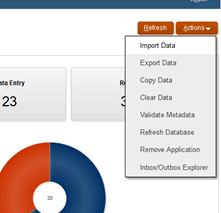
Oracle's Financial Consolidation and Close Cloud Service (FCCS) lets you clear data across a point of view. When you run Clear Data, you pick members for Scenario, Year, Period, Entity, Data Source, and Consolidation, and you can narrow it further with dimensions like Account, Movement, and Intercompany. Leave those optional ones unset and FCCS clears every level 0 member under them. Where people tend to get tripped up is what comes next, when they validate the numbers and the consolidated totals do not look the way they expect.
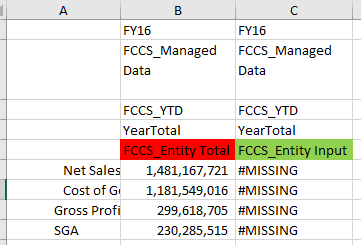
The key thing to understand is that Clear Data works on input data. For the Consolidation dimension you choose an input member such as FCCS_Entity Input, while the calculated members like FCCS_Entity Total are not something you can pick and clear directly. During consolidation, the data in FCCS_Entity Input rolls up, along with any adjustments, into the calculated FCCS_Entity Total. So when you clear the input, FCCS_Entity Total holds on to the totals from the last consolidation. FCCS signals this by setting the affected entities to a Calculation Status of Impacted, its way of telling you the consolidated numbers are now out of date.
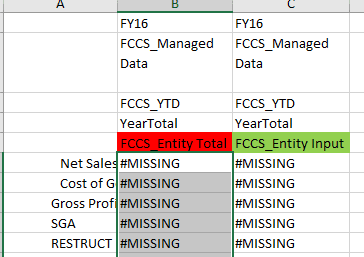
The fix is to run consolidation again once you have cleared. That recalculates FCCS_Entity Total against the emptied input, brings the consolidated level back in step with what is actually there, and keeps old figures from overlapping with your next load. Skip it and the confusion sets in: the input sits empty while the consolidated level still shows the previous totals, which is exactly what makes the data look wrong when you validate it.